 CRS Norwich
Covering all of Norwich and most of Norfolk.
Computer, Laptop & Console Repairs.
Book a repair appointment
 Menu
MenuHDMI Repair Norwich
Do you have a broken HDMI port?
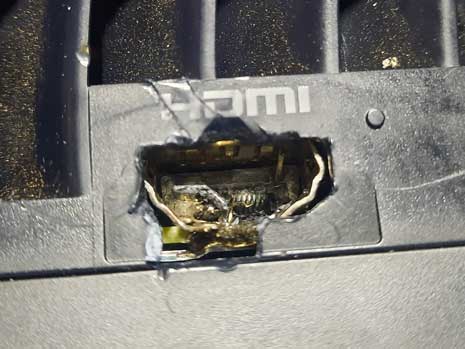
HDMI (High-Definition Multimedia Interface) cables and ports are essential for modern entertainment and computing setups, delivering high-quality audio and video between devices such as TVs, monitors, gaming consoles, and laptops. But when an HDMI connection stops working, it can quickly derail your setup.
Common Signs of HDMI Problems
No signal: The display shows “No Signal” despite devices being on.
Intermittent connection: The image or sound cuts in and out.
Distorted display: You see static, lines, or discoloration on the screen.
No audio output: Picture is visible, but there’s no sound.
Loose or damaged port: The HDMI plug doesn’t fit snugly or feels wobbly.
These symptoms typically stem from either cable damage, port wear, or internal soldering issues on the HDMI connector.
Step 1: Diagnose the Problem
Test the cable: Try the same HDMI cable on another device. If it fails across multiple systems, the cable may be bad.
Test another cable: If a different cable works, the fault isn’t with your device.
Inspect the ports: Look inside the HDMI ports—bent pins, dust, or broken solder joints can cause connection failure.
Check software settings: Ensure the correct input source and resolution settings are selected.
Step 2: Cable Repair or Replacement
If the cable is visibly damaged (fraying, bent ends, kinked wires), replacement is generally the best option—HDMI cables are inexpensive and difficult to repair cleanly.
Step 3: HDMI Port Repair
Repairing a damaged HDMI port is more complex. If a port has detached from the board, it must be re-soldered. This involves opening the device, aligning the connector, and melting solder onto each contact pad.
When pins are bent or broken, complete port replacement is necessary. Depending on the severity of the damage, sometimes, the contact pads on the circuit board also require repairs.
HDMI port repair usually requires experience with micro-soldering tools. If you’re unfamiliar with circuit work, it’s best handled by us.
Step 4: Prevent Future HDMI Damage
Avoid yanking cables and always grip the connector firmly when unplugging.
Use quality, tangle-free cables of appropriate length (shorter cables maintain better signal quality).
Add cable strain relief or right-angle adapters to reduce physical pressure on ports.
Keep ports clean and protected when not in use.
We can provide you with a magnetic HDMI connector which helps prevent damage reoccuring. Prevention is better than cure!
Conclusion
HDMI repair ranges from simple cable swaps to intricate micro-soldering tasks. For most users, replacing a damaged cable or cleaning the port will solve common issues. But when the port or internal board is compromised, professional repair with us is the safest path.